What is EveryField?
EveryField is the Salesforce app for finding any field value for any record without having to add page clutter.
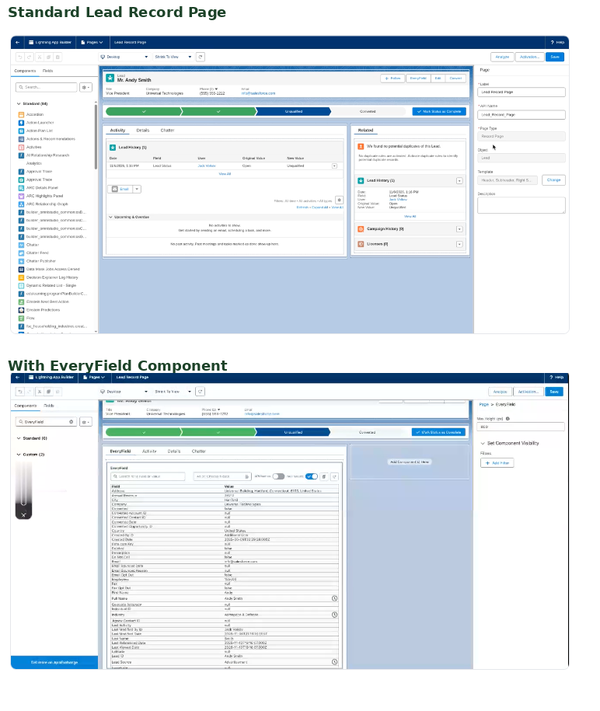
Add EveryField to any Lightning record page in App Builder. The component lists every field you can read.
How do I add EveryField to a Salesforce record page?
Does each Salesforce user have to install EveryField?
Nope. A Salesforce administrator can add EveryField once for everyone to use on any browser.
How do I find a field that is missing from the Salesforce page layout?
Use EveryField. It lists every field you have permission to read on that record, including fields left off the Lightning page. Search the field name and the row comes up. You do not have to add the field to the layout.
How do I search every field on a Salesforce record?
Use EveryField. Drag it onto the Lightning record page and search a field name or a value. EveryField checks the fields you can read on that record and shows the matches.
How do I find which Salesforce field holds a known value?
Search the value in EveryField. It matches field labels and field values on the record you are viewing. A search for a company name can return Address, Company, and Street when that text is in those fields.
How do I unclutter a Salesforce Lightning record page with hundreds of fields or extra tabs?
Leave lesser-used fields off the page layout and search them in EveryField. The Lightning page stays short. EveryField holds the rest of the fields you can read, so you are not scrolling through hundreds of fields or extra record tabs.
How do I hide blank or null fields when viewing a Salesforce record?
Turn null values off in EveryField. The list then shows only fields that have a value. Turn null values back on when you need to see the empty fields too.
How do I show the API name of a Salesforce field while looking at a record?
Turn on API Names in EveryField. The same list that shows field labels can show the API name, so you do not have to open Setup to look it up.
How do I see a Salesforce record as of a past date?
Use the As of date in EveryField. Pick a date and it rebuilds each field you can read as of that date, from Salesforce field history. The newest change on or before that date supplies the value. If every change is later, it uses the old value from the earliest later change. A related custom object with Snapshot in the name can be checked, but EveryField does not yet copy every field value from that snapshot. Field history wins when both exist. Clear the date to see current values.
How do I see every field on a Salesforce record without bypassing field-level security?
EveryField respects Salesforce field-level security and sharing. A user only sees fields they already have permission to read. It does not reveal hidden fields.
What does the EveryField 7-day free trial include?
The trial gives you full access to EveryField for 7 days after you install the package. You can add the component to any record page, search fields, toggle between labels and API names, and view field history where it is tracked.
How does EveryField licensing work after the trial?
After the 7-day trial, convert to a paid license ($9/month or $87/year) to keep using EveryField. Licensing is org-based. One subscription covers your whole Salesforce org.
Does EveryField work on custom Salesforce objects?
Yes. EveryField works on standard and custom objects as either a Lightning component, a Lightning button with a slide in, or a quick action button. If the object is available on a Lightning record page, you can add the component.
How do I see the history of one field on the open Salesforce record?
When a field has history tracking enabled, a history icon appears next to it. Click the icon to view the field history for that record.
How do I get started with EveryField?
Install EveryField in a production org: https://login.salesforce.com/packaging/installPackage.apexp?p0=04tWj000003Y2KDIA0. Install in a sandbox: https://test.salesforce.com/packaging/installPackage.apexp?p0=04tWj000003Y2KDIA0. Install starts a 7-day free trial, and one license covers the whole org. Edit a Lightning record page, drag the EveryField component onto the page, and save. Open a record and search a field name or a value.
Can I create an EveryField quick action on a Salesforce object?
Yes! EveryField already includes a quick action component for leads, contacts, accounts, and opportunities. Just drag and drop it into the page layout or Lightning page. It opens the field list in a window on the record.
Alternatively on any other objects:
1. In Setup, go to Object Manager and select the object.
2. Click Buttons, Links, and Actions, then New Action.
3. Set Action Type to Lightning Web Component.
4. For Lightning Web Component, choose EveryField Panel.
5. Enter a Label such as EveryField. The Name fills in automatically.
6. Click Save.
7. Edit a Page Layout for that object. In the Salesforce Mobile and Lightning Experience Actions section, drag the EveryField action onto the layout.
8. Save the layout.
The button appears on the record page. Click it to open the field list in a window.
How do I add EveryField to my Salesforce MCP server?
How do I contact EveryField support?
Use the contact form. We typically reply within one business day.